Roundup
The 8 best time tracking apps for Mac in 2026
Yes, we make one of these (Dayflow), so we ranked by use case instead of pretending there is one winner. A vendor-documentation comparison of capture, summaries, privacy, and billing. See the dated sources below.
The short version
- Best free & private: Dayflow - $0, open source, AI-written daily timeline, full recordings stored on your Mac
- Best for billing hours: Timing - document-level detail and invoiceable reports
- Best focus coaching: Rize - scores, break nudges, polished analytics
- Best distraction blocking: RescueTime - Focus Sessions and distraction blocking
- Best open-source raw logger: ActivityWatch - free activity data on every OS
- Best for agencies: Memtime - local capture synced into project software
- Best for teams: Toggl Track - shared projects and reporting
- Best one-time purchase: Qbserve - no subscription at all
Full comparison table
| App | Price and billing term | Automatic | AI summaries | Data stays local | Open source | Platforms |
|---|---|---|---|---|---|---|
| Dayflow | $0 · Pro optional | Yes | Yes | Recordings; local AI optional | MIT | Mac |
| Timing | Paid plans | Yes | Yes (Expert) | Cloud sync | No | Mac |
| Rize | From $9.99/mo annual | Yes | AI chat + categorization | No | No | Mac, Windows |
| RescueTime | From $7/mo annual | Yes | No | No | No | Mac, Windows, web |
| ActivityWatch | $0 | Yes | No | Yes | MPL-2.0 | Mac, Windows, Linux |
| Memtime | From ~€10/mo (2-yr rate) | Yes | No | Yes | No | Mac, Windows, Linux |
| Toggl Track | Free tier · $9/user/mo annual | Timers + automatic activity | No | No | No | Everywhere |
| Qbserve | One-time purchase | Yes | No | Yes | No | Mac |
1. Dayflow - best free & private
Dayflow
$0, MIT license · optional paid ProDayflow is a free, open-source work journal for Mac. Full recordings stay on your Mac. Local AI keeps analysis on-device, while BYO cloud providers and Dayflow Pro can receive selected screenshots for analysis.
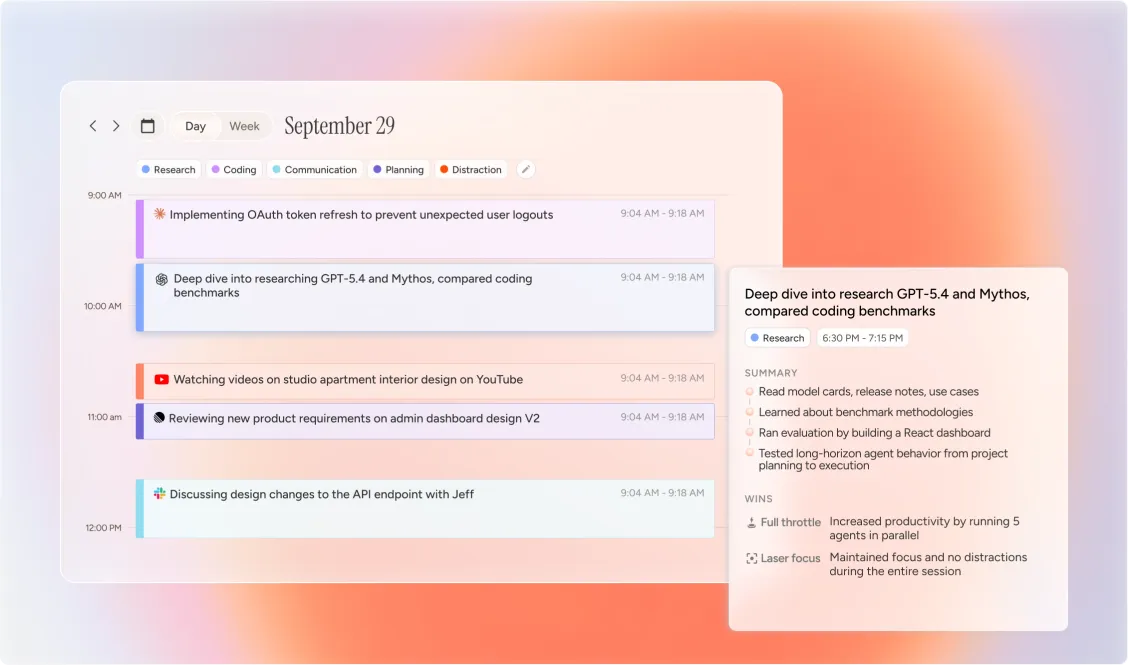
Dayflow records your screen at one frame every 10 seconds and has AI summarize each 15-minute block, so instead of "Chrome: 3.2 hours" you get "compared flight prices, then drafted the launch email." It is a native Mac app that works fully offline with a local model (Ollama or LM Studio), and the code is public under the MIT license. Honest limits: Mac-only (Windows waitlist), no distraction blocking, no invoicing, and recordings use local disk space. It is a work journal first, a stopwatch never.
2. Timing - best for billing hours
Timing
Paid plans · see Timing pricingTiming automatically tracks apps, documents, and websites, then rolls them into hierarchical projects with billing rates. If a client pays for your hours, this is the professional's tool. Mac-only, subscription with cloud sync, optional AI summaries on Expert. Alternatives here.
3. Rize - best focus coaching
Rize
From $9.99/mo annual ($12.99 monthly) · 7-day trial, no free tierRize tracks automatically and coaches actively: AI categorization, focus scores, break reminders, session goals. Its current plans also list AI chat, with MCP and automations on higher tiers. Available on Mac and Windows. Cloud-based and subscription-only. Alternatives here.
4. RescueTime - best distraction blocking
RescueTime
From $7/mo annual · 14-day trialRescueTime offers Focus Sessions that block distracting sites and apps, alongside activity reports. Its Solo + Timesheets plan adds a time-entry workflow. Activity processing is cloud-based. Alternatives here.
5. ActivityWatch - best open-source raw logger
ActivityWatch
$0, open sourceActivityWatch logs active apps, window titles, and browser tabs into local, queryable buckets on Mac, Windows, and Linux. Its core logger is free and keeps captured activity on your device. You interpret the data yourself - there is no AI layer. How it compares to Dayflow.
6. Memtime - best for agencies
Memtime
From ~€10/mo on the 2-year rate · 14-day trialMemtime captures your activity in minute increments, keeps the data offline on your device, and, on Connect or higher plans, syncs finished time entries into Jira, ClickUp, and other project tools. Built for reconstructing billable time across a team, not for personal reflection.
7. Toggl Track - best for teams
Toggl Track
Free tier · Starter $9/user/mo annualToggl Track supports timers and automatic desktop activity capture. You can review private app and website history and turn it into project time entries, then use shared reporting for your team. Choose it when the useful output is a timesheet. Choose a work journal when you want a narrative draft to review.
8. Qbserve - best one-time purchase
Qbserve
One-time purchase, no subscriptionQbserve is a Mac automatic tracker with productivity scoring where "all tracked data is stored locally on your Mac and never sent anywhere," for a single payment. Check macOS compatibility before buying.
Sources and review method
We build Dayflow. This comparison uses vendor documentation, not a benchmark of competitors running the same workload. Sources were reviewed September 6, 2026. We verified Dayflow 2.2.0 Markdown export and existing Codex and Claude Code connections, but have not measured comparative accuracy, battery life, or CPU use. Local model inference adds hardware demands beyond recording.
Timing AI summaries require Expert; Timing MCP requires Connect. Rize lists AI chat, with MCP on its Pro pricing card. For Memtime, project integrations start with Connect. Listed starting prices can require annual or two-year billing.
Price and product sources: Dayflow, Timing, Rize, RescueTime, ActivityWatch, Memtime, Toggl Track, and Qbserve.
Choose a Mac time tracker by what you need
The names overlap, but your goal narrows the list. For billable hours and Mac timesheets, start with Timing or Memtime, or see how to keep a Mac timesheet without manual entry. For automatic time logging with no timers, compare Dayflow, Timing, Qbserve, and ActivityWatch. If you mainly want to understand where your own day went, choose a work journal such as Dayflow and start with the where did my day go guide.
Turn your notes into a weekly status report, or keep a daily work log.
Frequently asked questions
What is the best free time tracker for Mac?
Dayflow and ActivityWatch. Both are free and open source. ActivityWatch keeps its activity logs local. Dayflow keeps full recordings on your Mac; analysis stays on-device with local AI, while BYO cloud providers or Dayflow Pro can receive selected screenshots. Toggl Track also has a free tier, with desktop activity capture and shared time entries.
What is the best automatic time tracker for Mac?
It depends on the output you want. For an AI-written journal of your day: Dayflow (free, open source, with local AI available). For billable-hours reports: Timing. For focus coaching and scores: Rize. For raw activity logs: ActivityWatch. All four track automatically with no timers to start or stop.
Which Mac time trackers keep data off the cloud?
ActivityWatch, Memtime, and Qbserve offer local activity storage. Dayflow keeps full recordings on your Mac and keeps analysis on-device when you use Ollama or LM Studio; BYO cloud providers and Dayflow Pro can receive selected screenshots for analysis. RescueTime, Rize, and Toggl process activity in their clouds; Timing subscriptions include cloud sync.
Do any of these record my screen?
Dayflow captures one frame every 10 seconds and stores the full recording on your Mac, so AI can understand context instead of just app names. Local AI keeps analysis on-device; BYO cloud providers and Dayflow Pro can receive selected screenshots. Rize also offers optional Screen Text access. Check capture permissions as well as storage settings when comparing privacy.
Start with the free one
Dayflow is $0 and open source. Full recordings stay on your Mac, with local AI available for on-device analysis.
 Download for MacOS macOS 14+ · MIT licensed · no account required